
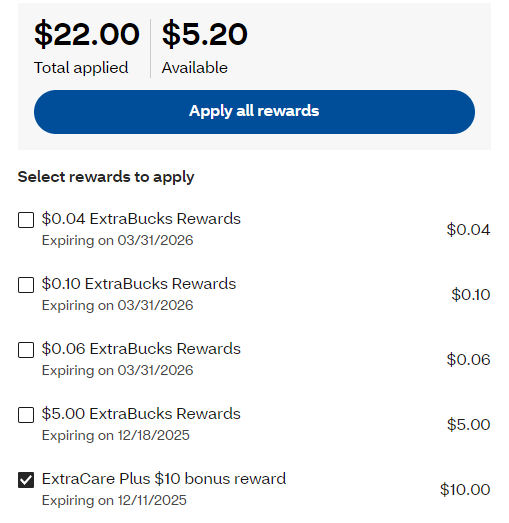
 CVS has updated their online checkout process. Now you can open up a little window to apply your ECBs. This is not as easy as they have tried to made it. Since I like to use coupons and get the best deal, (as I’m sure you do) I often add things to my cart and remove them. Once you have applied an ECB, you cannot remove it. Since I have Extra care plus, I need to leave $10 worth items to pay with money (rather than ECBs) or I get charged a $4.99 shipping fee. So I often have to remove the ECBs. You can uncheck it but it won’t remove it. You click apply or cancel and you cannot remove it. The only way to do so is to remove everything from your cart and start over. This is not the time saver CVS envisioned, so hopefully they get it fixed.
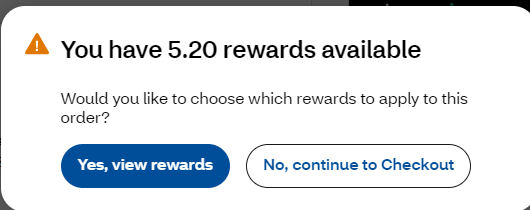 Once you have your order the way you like it and move forward, you get a little window to tell you you have ECBs you can use, but of course I don’t want to use these because again I’ll get charged a $4.99 shipping fee for going below $10. It’s time to thank CVS for another time wasting step.
It’s not all bad news for some of you. If you have EBT or an OTC card, you can now use these online! Now since we use ECBs to pay these are prorated across all items. You will only be able to use your EBT card for the cost of Snap eligible products after any portion of your ECBs that was applied to these items.




{ 1 comment… read it below or add one }
On the computer, click on ‘order summary’, then click on ‘view all your savings’. Then another window will pop up allowing you to remove ecb’s.